


Serif PagePlus
PPX9 • PPX9 is Excellent • New Features • Legacy Features • Tutorials • Support • Bugs
For reviews of earlier versions see the WayBack Machine Web Archive

Released 16th November 2015

CommunityPlus Closure
Serif CommunityPlus has now closed. Alfred has set up a support forum for Serif users.
Serif Legacy Products
With the Release of Affinity Designer for Windows, Serif announced that PagePlus X9, PhotoPlus X8, and DrawPlus X8 are legacy products. As of October 2019, they are no longer sold. If you do buy it on E-bay etc., make sure that it is a legal copy with a product key.
Legacy products can now be registered with a Universal Registration Key of 881887
Due to the success of Affinity Photo and Affinity Designer for the MAC, Serif have decided to concentrate their efforts on the Affinity range of products. They were designed to be cross-platform, so porting them to Windows has always been in the pipeline. It will be a while yet before Affinity Publisher is as capable as PagePlus X9. Affinity Designer and Affinity Photo for Windows have been available for some time.
For a few years yet PagePlus X9 will still be the best Serif DTP product for Windows users. The wish-list for future versions is defunct so I have removed it from this already too long page. Older versions are no longer sold by Serif so I have merged my reviews of them into the section on Legacy Features.
I was rather surprised to learn about the demise of Serif’s flagship product, but there’s no getting away from the fact that it’s getting harder to patch up the old ship and keep it competitive with modern alternatives. Although its feature set has kept improving with each new version, performance has suffered. Starting over with a new product is a sensible move from Serif’s point of view, although many users may be unhappy if they have no easy way of transferring their PagePlus work of many years. I am hoping that I will be able to rebuild my publications by importing WritePlus files, but I may well find myself in limbo for years before Affinity Publisher gets all of the features that I need. I currently face the same issue with my old browser.
The demise of WebPlus is not an issue for me at all. I can happily maintain my web sites using WebPlus X8 until my own demise. I only use the most basic features.
PagePlus X9 is Excellent
Publications saved from PPX9 will still not open in the Starter Edition or older versions of PagePlus without first saving them in PPX8 or PPX7. I assume that fixing this would have been too risky. I think that not many users will be affected by this.
Editing of Indexes is still much slower than in PagePlus X7. Unfortunately, I did not report this regression against PagePlus X8, so it has not been fixed. If you have a large index to edit, open the PPX9 file in PPX7 and do it there, before publishing from PagePlus X9.
Now that most bugs have been fixed, I don’t hesitate to recommend PagePlus X9 — even more so since it is now only £20. It has many significant improvements on earlier versions, and there are workarounds for most remaining bugs. In spite of it being the last version, it will be some years yet before Affinity Publisher for Windows is as powerful as PagePlus.
One major issue that has bugged me since the days of PPX5 has apparently been fixed. It is no longer impractical to work at high zoom magnifications due to serious redraw delays. Typically, I will zoom in to 800% or more to check fine details or the alignment of text and graphics, then scroll with the mousewheel, holding the shift key to pan.
New Features in PagePlus X9
Auto-frame • Calendar Events • Convert Text to Table • Enhanced PDF Support • EPS Export
GPOS Kerning • Guide Tool • Hunspell Support • Master Page Improvements • Placeable DPP files
QR Codes • Text Spacing Improvements • Tool Feedback • Tracking and Kerning • WebP Support
Auto-frame Synchronises Text Frames
Users accustomed to word-processors will find it easier to work in this mode. It will create a new page and automatically switch to this page for seamless word processing. One can specify the extent to which it does this, and in which way pages are created for the overflowing text.
Calendar events are now managed globally. Applying events will add them to all calendars in the current publication. Import and Export of iCalendar formats are also supported.
Tabulated data delimited by commas, tabs, paragraphs or custom characters, can be converted to a Table, which is attached to the text, but can also be detached using the Anchor Properties dialog.
- PDF/X-4 and PDF/X-5 formats are now supported.
- There are more options for the initial view of the PDF when it is opened in a PDF reader
Page Layout: Single Page/Column, Dual Page/Column (Odd left/right), User Interface: Hide Toolbar, Window Controls, Open Mode: Default, None, Bookmarks, Thumbnails, Fullscreen. - Two new scale factors on the Publish to PDF dialog are designed for exporting ISO size documents to the next smaller or larger size, e.g. A4 > A5 or A4 > A3.
- Overprinting on a per-object basis for line, fill, and text content.
- Overprint simulation is also provided to quickly check your work in PagePlus before exporting.
- PDF files now have an optional “Pass Through” mode. This ensures that any placed PDF files are rendered accurately when exported to PDF even though they may look incorrect within PagePlus.
Export to Encapsulated Postscript is now supported. There are options to control colour space, to deal with transparency, to output text as curves or to embed fonts.
Glyph Positioning (GPOS) tables for kerning are usual in Professional fonts, which often don’t include the legacy kern tables. Other OpenType features like Titling Capitals (cpsp) that rely on horizontal Glyph positioning are also supported, but features that rely on vertical positioning like mark positioning (mark) are not. My free OpenType fonts have both GPOS and legacy kern tables, but the GPOS kerning is far more comprehensive with pairs for Small Capitals, Petite Capitals, and Ligatures.
The new guide tool makes it easier to copy guides to other pages or layers, to move pairs of parallel guides together, to position guides accurately using the Transform Tab, or to nudge guides with the cursor keys. The Align Tab can be used to space guides evenly down or across.
Spell-checking and hyphenation dictionaries for languages from Afrikaans to Zulu that are supported by LibreOffice can be installed for use with PagePlus. The language used for spell-checking is a character level attribute that is set in the Format, Character, Language dialog. The dictionary to be used for checking that language is set in Options. For example, you could use the WinterTree dictionary for checking English, but the Hunspell dictionaries for checking and hyphenating text in Polish.
Available Hunspell dictionaries can be found on the LibreOffice/Dictionaries repository.
Example: To install a dictionary for Hungarian:–
 1. Scroll down to the hu_HU language link and open it.
2. Open the links for hu_HU.aff, hu_HU.dic, and hyph_hu_HU.dic.
3. Right-click on the (plain) text link at the top of each page to save the linked content to any convenient folder your hard drive, e.g. C:\TEMP\LibreOffice Dictionaries\.
4. In Windows Explorer, rename them from *.txt to *.dic or *.aff file extensions as appropriate.
 5. In the PagePlus X9 Options dialog, Text, Proofreading, click on the Install Hunspell Dictionary … button and browse to where you saved the dictionary files. Select the main dictionary (in the above example it will be the hu_HU.dic file) to install it. A dialog will then be shown where you can choose the languages that will use the new dictionary. If the hyphenation dictionary is available for your chosen language you will see a message saying that spelling and hyphenation dictionaries have been successfully installed. If no hyphenation dictionary is available, the message will say that a spelling dictionary was successfully installed.
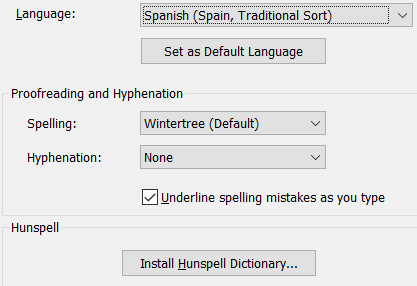 6. Having successfully installed the Hunspell dictionary and hyphenation module (if available) for your language, you still have to tell PagePlus to use it for checking that language instead of using the default Wintertree spell-checker. Go to Tools, Options, Text, Proof-reading, and open the Language drop list. Select your language from the list. In this screen shot, I have selected Spanish (Spain: Traditional sort). Then set the dictionaries for Proof-reading and Hyphenation to Hunspell. Before, closing the Options dialog, enable the checkbox to “Apply publication settings to new publications.”
Now any text in your publications that has the language attribute set to Spanish will use Hunspell. This is a global setting for new publications. Old documents will use the default Wintertree spell-check and hyphenation dictionaries unless you update this setting on opening them.
Simpler Method: Extract my Zip archives to a suitable folder and install them as from step 5 above:
Bosnian • Brazilian • Bulgarian • Croatian • Czech • Danish • English Australian • English British • Estionian • French • Galician • Greek • Hungarian • Icelandic • Latvian • Lithuanian • Netherlands • Norwegian • Polish • Portuguese • Romanian • Russian • Slovakian • Slovenian • Spanish • Swedish • Ukranian • Vietnamese
The archives contain the available *.dic and *.aff files for each language. All dictionaries are redistributed under the terms of the GNU License Agreement. Post on CommunityPlus if you need help getting the dictionaries for other languages or if you find an error in my archives.

Master pages can be renamed and assigned to multiple selected pages at once using the Pages Tab. Right-click a thumbnail to open the Add Master Page dialog.
 Any master pages that are assigned already will not be included in the list. More than one master page can be assigned to the same page. By selecting a range of page thumbnails in the pages tab, master pages can be assigned or removed for all selected pages at once.
If the “Page Identifiers” are shown in the pages tab then the Master pages assigned to any page are displayed as single letters A-Z etc.
DrawPlus X8 files can now be placed as images within your PagePlus document. From PagePlus you can then convert them to objects allowing for further modification. Earlier DrawPlus files are not supported, and multi-page DrawPlus X8 drawings should be saved with previews to allow all pages to be imported.

Originally designed to track components for vehicle manufacture, QR (Quick Response) codes are becoming increasingly popular in advertising, enabling smart phone users to quickly access product information such as a retailer’s website by reading the QR Code, which can contain significantly more data than a barcode.
New options on the Paragraph formatting dialog allow space above and below paragraphs to be ignored for adjacent text styles, added instead of using the highest value, and to honour the space before a paragraph at the start of a text frame.
 As in DrawPlus, objects can now show live feedback when being resized. The setting can be disabled in Tools, Layout, Display if you don’t find it helpful. The object’s dimension show only when placing, resizing, or cropping objects, including Text Frames, Artistic Text, Tables, and Pictures. Feedback for lines is shown only after placing them.
Tracking and Kerning
The default shortcut of Alt + Left/Right has changed to adjust tracking/kerning in larger steps of 1% or in fine steps of 0.1% by using Ctrl + Alt + Left/Right. In previous versions the step was 0.1%, which was good for body text, but too fine for larger sizes.
The WebP image format developed by Google offers improved compression over the JPG format for photographic images. Although it is not supported by Firefox, Internet Explorer, Edge, or Safari browsers its potential for reducing bandwidth makes it an attractive proposition for Web masters.
 On my web sites I provide a magnifying glass icon that users can click to view a high resolution WebP version. They can be viewed and edited in IrfanView if your browser does not support them. Opera and Vivaldi are ideal for viewing very large WebP images using fast scroll with the middle mouse button.
- If installing from a DVD, there are options not to install the extra fonts, samples, templates, etc., but these are not available with an electronic download. To work around this issue the installer can be extracted to a folder using 7-Zip, then setup.exe can be run from that folder.
- Edit the style sheets to check that everything is as you want it before you get to the final stages of your publication. Optionally, remove the 10 point spacing after each paragraph, and use a first line indent instead. Then Tools, Save Defaults, and make sure that “Text Styles” is checked.
- Create a new keyboard profile in Tools, Options, User Interface, Shortcuts. Modify or add shortcuts for each context, and save the keyboard profile. This shortcut data is in:
%AppData%\Serif\PagePlus\19.0\Accelerators\ which should be copied to a safe place to make a backup. To save time, download my Customised Keyboard Profile and copy it to the Accelerators folder, then select it in Options. The shortcuts are shown on the menus. Download my Cheat Sheet and edit it to keep track of any changes. - Customise the Toolbars and menus. If you have a 5:4 or 4:3 aspect ratio monitor, try moving the toolbars from the left side to the top of the window. This gives quicker access to the Studios and reduces mouse movement. Remove submenus wherever possible. For example, remove the Publications submenu from the View, Toolbars menu, and add items to the View menu to show or hide the publication tabs. If the publication tabs are on auto, the Toolbars submenu is not needed as right-click on any toolbar will show it. Assign shortcuts to show/hide the rulers and hintline. Buttons can be added to the menu bar. I have add the zoom drop list and zoom in/out buttons.
- Customise the Studios to suit your preferences. Save your workspace profile for future use or for sharing with others. To see what can be done, install my Compact workspace profile to:
%AppData%\Serif\PagePlus\19.0\Workspace Profiles\. Be mindful that the toolbars and menus have been heavily customised in this profile, but its easy to switch back to the default profile. - There is space for a floating Studio tab on top of the menu bar. With large (24 pixel) icons on a 1920 x 1080 monitor there is enough space for all of the icons that I need on one toolbar, with the context toolbar below. I have created a new toolbar called “Standard Plus,” and added an icon for “Update Text Style,” which I use frequently.

- Uninstall all of the fonts that you don’t use. PagePlus comes with a host of fonts, some of which are used by the design templates, but if you don’t use them, they just slow down font selection. The fonts installed with Serif applications (with the suffix SF) are of dubious quality, though the Bitstream fonts (with suffix BT or BTN) are better. Install my free OpenType fonts, which have a wide range of glyphs, or buy some Professional fonts with OpenType features. Get a font manager like MainType if you have a large font collection, or get the free AMP font viewer.
- Open the Fonts Tab, and mark your most used fonts as favourites. Then they will appear at the top of the font selection drop list. However, if you set up your styles properly, you will spend less time selecting fonts. Save the relevant Windows registry key (search the registry for “Font Collections”) as a backup. It also saves the most recently used fonts.
Baseline Grid • Colours and Swatches • Edit in External Program • EPUB3 • High DPI • Paragraph Tab
Placeable PDF Import • Table Format Gallery • Column Rules • TWAIN/WIA Scanning 64-bit Version
Blend Modes • Charts • Complex Fills • Convert to Objects • Export as Picture • Flowing Tables
Improved Studios • Restore Last Session • Serif GDI Rendering • Smart Hints • Startup Assistant
Workspace Enhancements • Anchored Objects • Asset Management • Customising • Dynamic Guides
Image Cutout Studio • Improved PDF Import • Interface Improvements • Logo Studio • OpenType Features • Photo Lab • Picture Frames and Borders • Polygon Operations • Resource Manager • Stroke Alignment
Table and Calendar Formats • Text Improvements • Word and LibreOffice Import
Baseline Grid
If the baseline grid is enabled in Options, any paragraph style that has “Snap to baseline grid” enabled will be moved down to fit the next baseline grid line. This feature automatically aligns the baselines of text on facing pages or in multiple columns, for a neater page layout. Individual text frames can have their own independent baseline grid for aligning of baselines in columns within text frames.
Colours and Swatches
The Colour Tab has been enhanced with a new mode to select colours from a picture. The Swatches Tab can be cleaned up or updated from the publication. leaving only those colours that have been used. The Colour Replacer can replace one colour with another.
 Edit in External Program
Instead of Edit in PhotoPlus, the Image context toolbar now shows a drop list of programs that may be used to edit an image. PhotoPlus will be added by default if it is installed. Other programs can be added: PhotoShop, IrfanView, FastStone Capture, etc.
 PhotoPlus will open in the background.
EPUB3
The latest specification for electronic publications is better suited to fixed layout publications. Users can now choose between fixed and free-flowing formats.
 High DPI
PagePlus is now designed for use on High resolution displays. Icons sets in different sizes can be chosen in Tools, Options. As displays have more pixels, icons and menus become tiny when using older software. Changing the Windows DPI settings will now automatically use larger icons with more pixels.
Paragraph Tab
The most frequently used paragraph formatting options are now available from a Tab on the right of the workspace. This adds nothing that cannot be done from the Format, paragraph dialog. In general, it is better to use styles to apply formatting changes globally. However, when you do want to change a setting for the current paragraph or a few paragraphs only, this makes it a bit quicker.
Placeable PDF Import
This is one of those long awaited features requested by professional users. It is especially useful for those who are publishing newspapers and magazines for placing advertisements. PDF files can be placed exactly as they are provided without the problems of missing fonts, etc.
Column Rules
The text frame properties dialog has an option to add column rules to the gutter to the right of the current column. Different line styles can be applied using the line tab after selecting the gutter — I have used a fancy line ending too with Internal Line Endings.
Text frames can also be set to “mirrored,” on Recto and Verso pages, and baseline grids can be enabled for text frames.
Table Format Gallery
The table format editor in previous versions has been updated with a more accessible method for editing, saving, and applying table formats.
TWAIN/WIA Scanning
A bit of code to form a bridge between the 64-bit version of PagePlus and 32-bit scanner drivers will enable more scanners to work with 64-bit PagePlus.
64-bit Version
The 64-bit version supports more RAM, which may help when working with large or image-heavy publications. Some users may have problems with finding suitable drivers for scanners. Scan images in another application and insert them using the Insert Picture route. That way, images can be compressed properly, and then linked.
Blend Modes
Added to bring PagePlus into line with DrawPlus and improve PDF import. Creative professionals may find a use for it to save opening another application. Blend Modes are on the Colour Studio Tab.
Charts
Two new studio tabs — the Chart Tab and the Chart Data Tab — support this feature. It is now possible to insert the usual chart types into PagePlus, and link them to a table or to tabular data.
There is a good range of standard Chart types — Area, Bar, Column, Line, Pie, Scatter, 3D Column, etc., — and an almost unlimited range of options for formatting them. 3D charts have all of the controls of other 3D objects.
The Charts category of the Styles tab contains a range of standard chart styles, to which user-defined chart styles can be added.
The chart title, series titles, and labels all use the Chart Body paragraph text style, but user-defined styles can be applied to each text group. Elements within the chart can be resized, moved, and rotated. The illustrated chart has its title moved to the left, and the series text moved to the right. The entire chart object has a drop shadow applied from the Effects Tab.
Complex Fills
The swatches tab now contains plasma fills, radial fills, square, and three or four colour fills. Again, not something that is important to a page layout program, but creative professionals will appreciate not having to open another application to creative graphics to import into PagePlus.
Convert to Objects
Similar to “Convert to Curves,” but it preserves text in Serif metafiles or data pasted from DrawPlus via the Windows clipboard, allowing imported vector graphics to be fully editable in PagePlus.
Export as Picture
PagePlus X7 added an Export as Picture dialog like DrawPlus, which generates a preview before exporting, and provides options for selecting Super Sampling, Compression, Colour-depth, etc., and shows the projected file size. On older PCs this extra step slows down the export of pictures if you already know the settings that you want to use. Using the “Super Sample” option will slow it down even more, but it does improve the image quality. In the screen shot below you can compare the image quality of fully compressed 32-bit transparent PNG against JPG at a high quality setting of 90%. Because this image is just text and a gradient fill, the PNG image is of a similar size, but sharper than the JPG image, where artefacts can be clearly seen at increased zoom levels.
PagePlus offers the option to export to SVG — a vector format designed for the web. PPX9 adds support for EPS (Encapsulated Postscript), and WebP, and if the image has a portrait aspect ratio two previews will be tiled vertically, but if it has a landscape aspect ratio they will be tiled horizontally.
Flowing Tables
Tables are no longer limited to a single page, but can be flowed down or to the right onto other pages, or on the same page. Rows or Columns can be selected to repeat in each section. Data from spreadsheets or word-processor tables that are longer than a single page can be cut and pasted into a PagePlus table that flows to more than one page.
 Improved Studio Tabs

Studio tabs have been a valuable feature of PagePlus for several versions. Three new studio tabs have been added to this version — Charts, Chart Data, and Effects. The HowTo studio tab was removed, and the fx dialog was replaced with the Effects Tab. The docking and management of Studio tabs has been revamped to increase the options for possible layouts, and to make them easier to use. Auto-hide now allows floating tabs to hide away after use with having to collapse them. As soon as the mouse cursor is over the tab group on auto-hide, it flies open. It can be pinned open using the middle icon of the three on the right, or left unpinned to collapse soon after moving the cursor away. Tab groups can be maximised, minimised, or restored. Tool-tips have been made to match the Toolbar tips.
Restore Last Session
In Tools, Options, General, users can choose from three options on startup: Show Startup Assistant, Restore Last Session, or Create New Document. Restore last session will open PagePlus with the same publications that were previously opened, and each will be displayed at the same page and the same zoom level as last time. If the windows were tiled, or a new document window was opened, the window layout will also be restored. This is a huge time-saver for long books or projects involving more than one publication. Quickly resume work without having to reopen publications and find your place.
N.B. If multi-page view was in use, although this will be restored, the layout and position will not.
SerifGDI Rendering
Improved performance and quality of rendering on the screen. The page tab especially will benefit from this to generate thumbnails of the current publication.
Smart Hints
Like DrawPlus, popup notifications will advise the user when performing certain actions. When no longer needed, they can be disabled in Tools, Options, Smart Hints.
Startup Assistant
This is the Startup Wizard by a new name, but with some new and improved features. It replaces the Browse dialog that was removed from earlier versions with previews of publications opened in the previous days and weeks. The learning zone provides quick access to videos, help, the manual, the support forums, and Facebook support. A news feed keeps the user informed of recent developments. Templates can also be opened from here.
 Workspace Enhancements
Workspaces have been around as long as the Studio Tabs. In previous versions one could save and load customised workspaces to suit different projects. Toolbars and menus could be customised before too, but to backup changes entailed a two-step process of exporting a Windows registry key and copying a file from the %AppData% folder. In PPX7, the toolbars and menus are now saved with the workspace, so the user only needs to copy the relevant *.wtb file from the %AppData%\Workspace Profiles\ folder to an external drive to make a backup. A drop-list on the context toolbar makes it easy to switch workspaces.
 Remember to save any changes made to the toolbars, menus, or studio tab layout to a workspace file before selecting another one.
Anchored Objects
Images, Tables, Text Frames, Artistic Text, or groups can be anchored relative to the page, page margins, frame, column, or character.
Asset Management
The Assets studio tab replaced the Media Bar, Insert Logo dialog, and Gallery Tab. This requires makes it easier to associate content with publications, and adds the possibility of saving asset packs for sharing content.
Assets can be pinned so that they are always available. In the screen shot of the Assets tab on the right the logos are pinned in the Graphics category, so that they can be dragged to any new document.
Warning: Assets are loaded with the document, so pinning too many assets will slow down document loading This may be very significant with large images on old hardware.
Groups of objects can be saved in My Designs from where they can be dragged onto the page for reuse.
Customised borders can be added to the Picture Frames category, but can no longer be saved for quick access from the Line and Border dialog.
The backgrounds category is new and offers a quick and easy way to add a background layer to a publication or web site. Background layers are locked. To edit them, open the layers tab to unlock them.
The Pictures category replaces the Media Bar tab from PagePlus X5. I find it easier to insert pictures from disk by browsing to find what I want using the Windows Explorer previews. In my opinion, adding large picture collections to the assets tab is a waste of time and resources.
Customising Toolbars, Menus, and Keyboard
 Since PagePlus X3 it has been possible to customise the toolbars and menus. Right-click on any toolbar or the menu to open the customise dialog. Right-click again on the menu to customise it, or on any toolbar button to change the button, paste a new image from the clipboard or import an icon from disk.
Create new menus, new toolbars, or new flyouts to have all the commands that you use most frequently wherever you want them. WebPlus uses the same interface for customising the GUI.
The scanner icon was extracted from the VueScan executable using @IconSushi, scaled to 20x20 pixels using IrfanView, then imported to the button editor using the folder icon.
The keyboard can be customised, greatly increasing workflow. Read my Customising Tutorials for more details.
Dynamic Guides
Easier alignment and positioning of objects using dynamic guides. Align objects to each other, to the page margin or page edges. This is a huge time-saver when laying out pages. Objects just snap into place where they are most likely to be needed. Nudge is also customisable to position objects more accurately.
E-Book Publishing
I anticipate that this exciting new feature will encourage many to upgrade or migrate to PagePlus. I also expect that it will generate a storm of questions on the support forums as new users struggle with new concepts. Some may be frustrated if they expect to just open any existing publication, choose the publish to E-book option, and expect it to just work. Publishing for hand-held E-readers like the Kindle requires an entirely different design approach to print or PDF publishing. If, like me, you have no previous experience in designing E-books, be prepared to read the manual, and to redesign your publications to suit the free-flowing layout used by this format.
Image Cutout Studio
Any photograph can be edited within PagePlus to remove its background. The intelligent masking brushes in the Cutout Studio are faster and easier to use than other magic wand tools I have used. Even the most intricate backgrounds can be removed quite easily by adjusting the tolerance and size of the brushes. Hold the Alt key to toggle the brush function between remove and add. Many image backgrounds take just a few strokes of the brush to remove. Zooming and Panning with a scroll-wheel mouse is just as easy as in the main PagePlus window, so for detailed work one doesn’t need to keep changing tools.
After removing the background you can preview how it looks with a transparent background, or a uniform tint. The mask can be saved as a Vector-cropped Bitmap, or as an Alpha-edged Bitmap. The HowTo help in the Image Cutout Studio guides new users through the process.
Improved PDF Import
Imported PDF documents have fewer text blocks and greater accuracy. Optimise for accuracy or for text flow. Crop to page area leaving registration marks on the pasteboard. Embed fonts to allow document editing if permitted. With improvements to the manual flowing of text between frames, PagePlus is now a viable choice for editing PDF files if the source document is no longer available.
Interface Improvements
- Document Tabs — The new Publication Tabs toolbar can be shown automatically if more than one document is open, or left permanently shown or hidden. Tabs can be arranged in any order by dragging, and closed from a context-sensitive menu. The toolbar can be docked vertically on the side of the window, docked at the top or bottom, or left floating.
- The Text Styles Palette now includes a field to show any direct formatting that has been applied on top of the current paragraph style.
- Saving defaults has been made simpler. A dialog with four checkboxes offers a choice of which defaults to save: document and object defaults, text styles, object styles, and Table/Calendar formats.
- The shortcut customisation dialog now shows a warning if a shortcut is already used in another context.
- The snapping icon on the hintline has a popup menu to select from the most popular snapping options.
- Rotated Tables can be unrotated for easier editing by double-clicking just outside the resizing handles with the pointer tool . Double-click again after editing to reinstate the original rotation.
- Starting page numbers can be entered as Roman numerals or Alpha characters, not only as integers.
Logo Studio
The popular, but outdated LogoPlus was replaced by Logo Studio. Users can edit any group of objects as a Logo within PagePlus, using an alternate interface focused on logo creation. The Logo Studio has its own customisable toolbars, studio tabs, guidelines, and a HowTo tab to help new users learn how to create logos. A wide range of predesigned logos provide the artistically challenged with some design ideas to get them started.
OpenType Features
The implementation of OpenType features is particularly slick. For example, enabling Small Capitals, ligatures, or fractions in the Character formatting dialog will use OpenType features automatically if those features exist in a font. If not, PagePlus will create Small Capitals by scaling capitals in the usual way, use ligatures if they exist in the font, and generate fractions using bold superscripts/subscripts. Times New Roman contains ligatures for fi and fl. Any fraction will be auto-generated, including fractions with text like 1/x.
C ommon OpenType features can be toggled on/off using an icon on the context toolbar, and formatting attributes have a new icon to replace the underline icon, which can toggle the last used character attribute on/off with one click. The formatting fly-out can be detached as a floating palette.
Some fonts like Palatino Linotype have OpenType features that use glyphs with no code-points. Unless you know about these special glyphs you may never see them. Palatino also includes a full set of Petite Capitals. The Insert Symbol dialog has a radio button to show Glyphs instead of Unicode.

When the radio button is enabled all of the glyphs in the font are sorted by their glyph index, and the Character Code is shown as G+nnnn (Glyph Index) instead of U+nnnn (Unicode code-point). Palatino Linotype is particularly unusual as the glyphs are not sorted in strict Unicode order. However, be aware that since it uses the glyph index, if the font is changed, another font may well have a different glyph in that position or no glyph at all, resulting in the .notdef glyph being displayed instead.
 Photo Lab

An image adjustment studio with Quick Artistic effects, adjustment filters, and special effects. This powerful new feature can almost replace PhotoPlus, though you will still need PhotoPlus if you want to import RAW images or for extensive retouching and painting of images.
Filters are non-destructive — by default the original image is stored along with any changes made. This greatly increases the file size though, so you may prefer to disable the option in raster effects to save adjusted bitmaps. This will also speed up document loading.
Photo Lab is so powerful I never need to open PhotoPlus to apply effects to images.
Picture Frames and Borders
 Create custom borders from bitmaps. A wide selection of artistic picture frames is provided, but you can define your own, and they will be shown at the top of the list. The 1" border on the right was applied to a text frame on an A4 page. Mouse-over the image to see how it looks at 0.75" and click for a 0.5" border.
In PPX6 or later, the Picture Frames can be found in the Assets tab. Drag them onto the page and then insert a picture, or drag and drop them onto a picture to add the border to the picture.
In PPX4 or earlier, to add them to a text frame, table or Quick Shape, open the Line and Border dialog from the Format menu, and select a border from the drop list. From this dialog you can define the border’s width, the edges to apply it to, and whether to scale it with the object.
To define a custom border, create a graphic with patterns that will repeat on the sides and top, and corners that are used only once. Import the image into the line and border dialog, and open the widths dialog to define where the image will be split. Drag the lines to define the areas that will repeat and those that will not. If you want the centre to be drawn too, check the “Draw Centre” option on the border dialog. I used an image of about 1800 x 1200 pixels @ 300 dpi, but 1200 x 800 pixels would probably have been good enough — 96 dpi was not.
Polygon Operations
More versatile shapes can be created by combining or intersecting existing shapes, e.g. a quick arrow and a quick donut like this.
Resource Manager
More flexible management of resources. The picture properties dialog has been replaced. Instead the Resource Manager opens showing a thumbnail preview of the picture and details about it.
Images can be exported or replaced from the resource manager. Linked files can be embedded, and embedded files can be made linked. To locate the file in the document, double-click the asset name or click on the locate button. Sort document assets by filename, size, etc., by clicking on the column headers.
 Stroke Alignment
Alignment of objects to the inside, outside, or centre of strokes. Lines and borders can be inside, outside, or centred on the object’s fill.
The screen shot shows a 0.5” square with a 50% transparent yellow fill, a 6 point cyan border behind the fill, mitred joins, and inner, centre, and outer stroke alignment.
 Table Formats


Table and Calendar Autoformat Editor — Create calendar and table formats to apply to any calendar or table. Define table header and footer rows, header and footer columns, and repeating rows/columns. Apply fonts, fills, transparency, and borders as part of the cell definition.
This custom format for a Year Planner has a Header row for the year and title, another Header row (Caption) for the days of the week, a Header Column for the months, and footers for other details. The Weekdays and Saturdays/Sundays repeat, with different cell formatting, until the footer column. The month row repeats until the footer row.
Text Improvements
- Adaptive Letter Spacing — This feature improves text justification by condensing or expanding the spacing between characters wherever necessary. Not only does justified text look better, copyfit is improved by as much as 5%
- Finer control over Tracking and Kerning, now in 0.1% increments. In previous versions the 1% increment gave only three or four usable values. To change manual kerning for artistic text, use the slider on the character tab.
- INITIAL WORDS — Format the initial words of a paragraph with Caps, Small Caps, Bold, a different font etc. Very useful in conjunction with Drop Capitals, or without them.
- The enter key now turns off numbered and bulleted lists if the last line is blank.
- The bucket tool can be used to join text frames and create new frames. Click on the overflow icon, then drag with the bucket tool to create a linked frame.
- Revamped default text styles palette to allow different default paragraph styles for different types of text object.
- Improved Table Quick Fill for European languages.
- Show·Special·Characters » » Show/hide·non-printing·characters·such·as·line,┘
column,·frame,·and·page breaks,·date·fields·and/or·spaces·in·layout·view.¶ - Insert a zero width space to add optional line-breaks without the hyphen.
Word and LibreOffice Import
Import LibreOffice and Word Docx documents without either program installed. Import most text formatting, footnotes, graphics, tables with formatting, index marks, and paragraph styles.
I have added this tutorial section with tips and tricks to get the most out of PagePlus using some of its more advanced features. The PagePlus X9 Help or PDF User Manual is the first place to look.
All of the tutorials presented as PDF files were produced using PagePlus. Most are also relevant to earlier versions of PagePlus, and some to other Serif Applications such as DrawPlus or WebPlus.
 Access Keys on Menus — Modify menus to remove submenus wherever possible, ensuring that all items have a unique access key. The PagePlus source file serves as a template. Examples are given for DrawPlus X8, PagePlus X9, PhotoPlus X8, and WebPlus X8.
 - Adding Captions to Images — Using endnotes for sequentially numbered captions for illustrations, and a list of illustrations.
 Advanced Typography — How to use Optical Justification, Tracking, Kerning and Adaptive Letter Spacing to improve the appearance of printed text, and to save paper.
 - Creating Graph Paper — An exercise in using layers and the replicate feature, with precise positioning using the Transform Tab to create an A4 graph paper with 1 cm, 0.5 cm, and 1mm grids in different colours and line weights. The tutorial is in PagePlus X8 format.
- Custom Borders — Importing borders from PagePlus X3 or earlier and saving them for reuse in more recent versions. Using the Assets Tab to add borders in PPX6 or later.
- Customising PagePlus — Getting the most out of PagePlus by customising the Toolbars, Tabs, Menus, Shortcuts, and Styles. Much of the advice is relevant to other Serif™ applications.
- PDF version of the above tutorial for users of early versions of PagePlus that cannot open PagePlus X9 publications (X5 or earlier).
- Customising PhotoPlus — PhotoPlus is not yet as customisable as PagePlus, but all of the basics are available. Customise toolbars, menus, workspaces, and keyboard shortcuts.
- Customising WebPlus — WebPlus shares most of the features with PagePlus for customising the menus, toolbars, shortcuts, and workspaces, but there are a few differences.
- Customising Keyboard Shortcuts — This tutorial in PagePlus format with tables that you can modify to make a cheat sheet of your own keyboard shortcuts.
- Designing a Book in PagePlus — This tutorial suggests a workflow for setting up a book for printing, staple-fold home production, or publication as a PDF file.
- Formatting Footnotes — This tutorial shows how to format footnotes in columns at the bottom of the page, how to modify footnote options, and how to insert cross-references to footnotes.
- Headers, Footers, and Page Numbering — How to set up running headers, bottom centre page numbers on title pages, and define separate page numbering sections for long books.
- Logos — How to create text in a circle for logos. Type artistic text directly on a path, select a preset path after typing the text, or select artistic text and a curve, then fit text to path.
- Looking Inside Documents — How to extract Serif documents, to repair or examine the contents. Sometimes, corrupted files can be repaired with the help of 7-Zip.
- OpenType Features — An explanation of the OpenType features supported in all recent Serif Applications. You can find several free fonts with OpenType features on my fonts page.
- Optimising PDF Files — Using different PDF profiles to control file size and image quality. Optimising images before placing them to minimise file size without compromising quality.
- Sharing Dictionaries — Using the same User Dictionaries (word lists) with multiple Serif Products: PPX7, PPX8, PPX9, WPX7, WPX8, etc.
- Styles — Using paragraph, character, nested, and object styles. The updated tutorial on Customising PagePlus is in PagePlus X9 format.
- Text Behind Image — Using the irregular crop tool to make text on top of an image look like it passes behind a head (or other object) in an image.
- Tickets — Create event tickets or raffle tickets with a tear-off ticket stub. Designed with three leading zeros for up to 9,999 tickets. Add more pages for more than 100 tickets.
- Translation Layers — Create multi-lingual publications by using layers. Hide other layers while editing the current translation, and while printing the finished publication, one language at a time.
- Vertical Text — Create vertical text for signs that read downwards using artistic text or paragraph text.
- Working With Fractions — Using OpenType features, or using autocorrect to enter the precomposed fractions found in other fonts. How to get the best looking results.
- Working With Indexes — Adding multiple entries, Locating and Editing Entries, Adding an Index of Proper Names, Formatting Indexes using Find and Replace with Regular Expressions, working around bugs in hyphenation.
- Working With Pictures — Inserting multiple images, using picture frames, adding frame borders, and creating custom borders. Image dimensions, resolution, quality, and file size. Resizing, exporting, and manipulating images. Linking embedding images.
Significant Bug Fixes
 Autocorrect option for numbered list breaks data entry for tables.
Difficult to place text cursor next to column gutter.
 Gutters and Rules not saved with Text Frame defaults.
Text rotated on some imported PDF files (see
Table Quick Fill bug fix for H I > H I J K L instead of H I II III IV (this old bug goes back to PagePlus X6. Some bugs don’t affect enough users to deserve attention)
Bugs Remaining After Patch 19.2.0.22
These bugs are old,* and these are new in PagePlus X9.**
 Constrain fill rotation by 15° increments modifier key shift does nothing.**
Drop Caps Use Advance Widths of Caps for Word Start Alternates.*
Edit in PhotoPlus Opens in Background.**
Image Cutout Studio Converts PNG to WDP.*
Images set to use a line border are not placed at their native resolution and will be distorted unless they have a square aspect ratio.*
No minimum width of Studios† (in PPX5 resizing it to < 50 pixels docks it shut)
Opening the Options dialog while editing returns focus to the top of the text frame.*
Picture frame borders are inverted if created from cropped pictures.*
Place as raster does not work as expected for EPS images.**
Table sort is not available for split tables.*
Underlining does not align with dot leaders …* (see this CommunityPlus thread)
Windows jump lists do not respond as they should in Windows 7.**
Deprecated Features
- Assign Insert and other Reserved key shortcuts to commands
- HowTo Studio Tab (replaced with Smart Hints: Tools, Options, User Interface)
- Kerning shortcuts Ctrl+Alt+Plus/Minus and Ctrl+Alt+Equals/Hyphen perform coarse adjustments of 0.12 points for 12 point text (1%) in PPX9 instead of 0.012 points (0.1%) as in PPX8 or earlier versions. Cursor key shortcuts Ctrl+Alt+Left/Right do fine kerning, while shortcuts Alt+Left/Right do coarse kerning.
- Media Bar and Gallery Tab (replaced with the Assets Tab)
- Unable to open PagePlus X9 publications in earlier versions (PagePlus X2 to X5).
Workaround: Open and save in PPX8 to PPX6, then open those versions in PPX2 to PPX5. - Studio Tab Animation
- Studio Tab Auto-optimizer
- Web Publishing Mode (replaced with Export to HTML)
Page last updated on 25 December 2024